Clover POS
Clover Loyalty Program ROI for SoCal Restaurants
Loyalty members spend 60% more and visit 90% more often. MKR Systems sets up Clover loyalty free for qualified accoun...
MKR Systems brings Clover POS, AT&T Internet Air, UniFi, and 3CX to your San Diego restaurant. Free installation, free menu build, free training. Warning: used Clover devices explained. 888-382-5164.
The MKR Systems truck is loaded and heading to your location. Clover POS hardware, network cable, anchors, AT&T Internet Air equipment, and 3CX provisioning gear — all on board. Installation, menu build, and staff training: all free. And one important thing every restaurant owner needs to know before buying used Clover hardware.
The All-In Connectivity Package
Restaurants have seasons and situations change. Getting locked into a 24- or 36-month contract means you can't upgrade, downgrade, or switch without penalties. MKR Systems' $249/month package is always month-to-month. Your business grows, we grow with it — on your timeline, not a contract's.
What Free Installation Actually Covers
Cat6 wired connection for the POS terminal and kitchen devices (KDS or printer). Wired is more reliable than Wi-Fi for POS — and better for PCI compliance.
Menu items, modifiers, combos, categories — entered from scratch. A properly built menu affects kiosk, online ordering, and KDS routing. We do it right.
Clover Dining floor plan — configured to match your actual restaurant layout. Servers assign orders to the correct table, and KDS routes tickets accurately.
Staff accounts, permission levels, PIN setup, and fingerprint enrollment. Then hands-on counter training so your team is confident from day one.
Important: Used Clover Hardware
If you bought a used Clover device on eBay, Amazon, or from a previous business owner — there is a high probability it will not work. This is not a bug. It is an intentional design restriction.
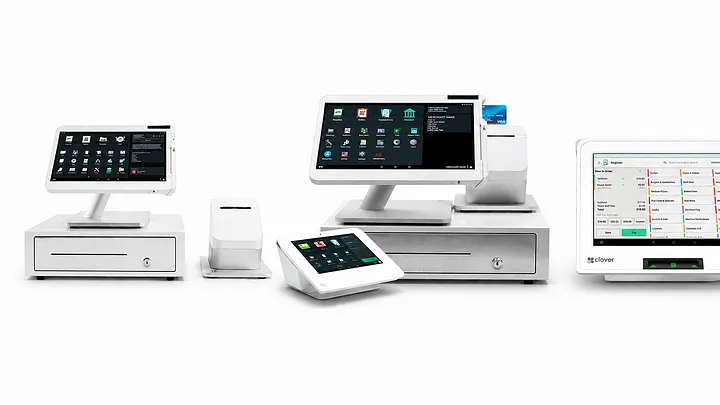
Every Clover device is permanently linked to the specific Merchant Services Provider (MSP) that originally provisioned it. A device from Bank of America is a Bank of America device. To move it to another processor (like MKR Systems / Fiserv), you need approval from the original MSP AND approval from Fiserv — simultaneously. Without both, the device is effectively a brick.
| Scenario | Re-provision Possible? | Requirements | MKR Recommendation |
|---|---|---|---|
| Same processor, different location | ✓ Yes | Original MID + serial + new activation code | MKR can help |
| Different processor (e.g. BofA → Fiserv) | ✗ Generally no | Original MSP official release — rarely granted | Buy new hardware |
| eBay / Amazon used purchase | ✗ Almost never | Seller won't provide original MSP info | Do not buy |
| Purchased directly from prior owner | △ Conditional | Prior owner's MID + serial + original MSP cooperation | Call MKR first |
| Gen 1 device (C010, C020, C030, C041) | ✗ Not recommended | End of App Update: May 15, 2026 | Replace immediately |
Clover Station C010, Mobile C020/C021, Mini C030/C031, and Flex C041/C042 all reached End-of-App-Update (EOAU) status on May 15, 2026. No more app installs. Existing apps frozen at last version. Security patches limited. Check your serial number now. If it matches any prefix above, call MKR Systems — we'll verify your status in real time and walk you through your upgrade options. Free. No obligation.
Have your device serial number and the previous MID ready.
We'll tell you honestly whether re-provisioning is possible — or whether new hardware is the smarter move.
Frequently Asked Questions
The installation itself is free. MKR Systems is an authorized Fiserv / Clover reseller — installation costs are covered through the new Clover system purchase and processing agreement. You pay for hardware (at purchase) and the monthly software plan ($14.95–$84.95/month depending on plan). Installation, menu build, table layout setup, and staff training are all included at no additional charge.
Possibly, but it requires conditions. You need the previous owner's Merchant ID, the device serial number, and cooperation from the original processor (MSP) to officially release the device. MKR Systems can check this for free — call 888-382-5164 with the device serial number ready. We'll tell you honestly whether re-provisioning is feasible or whether buying new hardware makes more financial sense.
Everything: menu items, modifier groups, combo meals, pricing, categories, and photos. For full-service restaurants, we also configure happy hour and time-based menus. Menu build is typically completed on installation day. For restaurants with 100+ items or complex modifiers, it may extend into the following day. Provide us with your current menu PDF — we handle the rest.
AT&T Internet Air is a business-grade fixed wireless internet service running on AT&T's 4G LTE and 5G network. No cable installation required. For locations where AT&T fiber isn't yet available, Internet Air provides the same reliable connectivity for POS, KDS, online ordering, VoIP, and cameras. MKR Systems includes AT&T Internet Air in the $249/month bundle — and upgrades you to fiber the moment it becomes available at your address, same price, no new contract.
Yes. MKR Systems serves all of San Diego County — including San Diego, Chula Vista, El Cajon, La Mesa, Santee, Escondido, Poway, and surrounding communities. We come to you for the on-site installation, menu build, and training. Call 888-382-5164 to schedule your free installation.
One call. MKR Systems comes to your location.
Clover POS, network, and phones — all handled.
Mon–Fri 9AM–6PM PT · MKR Systems · San Diego, CA
San Diego · Poway · Chula Vista · El Cajon · La Mesa · Santee · Escondido
→ Call Now Book Free Consultation →Related Reading
Cash Register → Clover POS: The Real Numbers → The Real ROI of Self-Ordering Kiosks → 3CX Digital Receptionist for Restaurants → Clover Gen 1 End-of-Life Upgrade Guide →MKR Systems, Inc. is an authorized Fiserv / Clover reseller serving San Diego County. All Clover hardware pricing, software plans, and re-provision policies are subject to change by Fiserv without notice. Free installation, menu build, and training are provided at MKR Systems' discretion upon new Clover POS system purchase and processing agreement. Re-provision eligibility depends on original device history and Fiserv approval — MKR Systems cannot guarantee re-provision outcomes for third-party purchased devices.
MKR Systems
One local partner for Southern California restaurants & retailers.