Clover POS
Clover Loyalty Program ROI for SoCal Restaurants
Loyalty members spend 60% more and visit 90% more often. MKR Systems sets up Clover loyalty free for qualified accoun...
Clover Gen 1 hits EOAU May 15, 2026. No patches, no new apps. MKR upgrades SoCal restaurants. Free statement review first. Call 888-382-5164.
Step Zero — Check Your Device Right Now
You don't need to wait for something to break to know if you're affected. Flip your device over and look at the serial number on the back. If it starts with any of the prefixes below, you're running a Gen 1 device that hit End-of-App-Update on May 15, 2026. You can also find it in your Clover Dashboard under Settings → Device.
| Serial Prefix | Device Model | EOAU Date | Status |
|---|---|---|---|
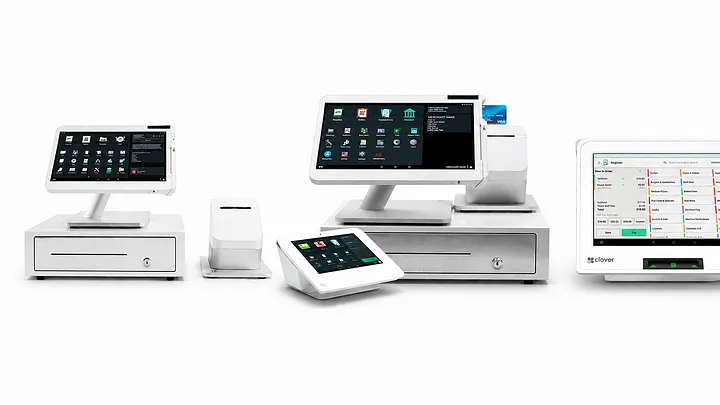
| C010 | Clover Station (original) | May 15, 2026 | End of App Updates |
| C020 / C021 | Clover Mobile | May 15, 2026 | End of App Updates |
| C030 / C031 | Clover Mini (Gen 1) | May 15, 2026 | End of App Updates |
| C041 / C042 | Clover Flex (Gen 1) | May 15, 2026 | End of App Updates |
| C050 | Clover Station 2018 | Sep 30, 2024 | Already expired |
| C053 | Clover Station Pro | Sep 30, 2024 | Already expired |
| C401U | Clover Mini Gen 3 | — | ✓ Current — no action needed |
| C302U / C303U | Station Solo / Station Duo Gen 2 | — | ✓ Current — no action needed |
Not sure? Call MKR Systems at 888-382-5164 — we can look up your device status in real time using your MID and serial number.
What EOAU Actually Means for Your Business
Here's what the official Clover / Fiserv documentation says happens when a device reaches EOAU — and what that means in plain language for a restaurant or retail shop in Southern California.
You cannot discover or install new apps from the Clover App Market on these devices. If a new delivery integration, loyalty program, or KDS app launches, you can't use it. Your competitors on current hardware can.
Every app on your device is locked at the last version installed before the EOAU date. Developers cannot push updates to these devices. Bug fixes, new features, UI improvements — none of it reaches you. The apps work, but they're stuck in time.
Clover may provide limited OS security patches after EOAU, but no new features will be developed. As vulnerabilities are discovered in the underlying Android version, patches become less likely and less comprehensive. Your payment device is processing real card data — this is a real risk.
PCI DSS v4.0 (effective March 31, 2024) requires that payment systems receive active security patches and maintain current software. A device running frozen, unpatched software is harder to justify in your annual Self-Assessment Questionnaire — and could trigger higher interchange rates or processing restrictions.
We want to be honest with you: your Gen 1 Clover won't suddenly stop taking payments on May 16, 2026. It will still power on. It will still process cards. The apps already installed will keep running. But every day that passes after the EOAU date, the gap between your device and current security standards widens. And the business cost isn't just security — it's every new app integration, every new Clover feature, and every operational improvement that's available to restaurants running current hardware. The risk is real and it compounds over time. Upgrading now is always cheaper than upgrading in crisis mode.
Before We Touch Your Hardware
Most upgrade conversations go like this: the reseller tells you what hardware you need, gives you a price, and that's it. At MKR Systems, we do something different — and it's the step that saves our clients the most money. Before we recommend any new hardware, we review your current merchant processing statement. Why? Because the hardware decision and the processing rate are linked. Upgrading to a new Clover while staying on an overpriced flat-rate plan means you're leaving real money on the table every month.
Send us your last 2 merchant processing statements. We'll tell you exactly what you're paying, what you should be paying, and which Clover hardware makes sense for your volume and card mix. No commitment required. Most SoCal restaurants save $1,000–$2,500/year after the switch.
The MKR Upgrade Timeline
Here's exactly what the MKR Systems upgrade process looks like. Most clients go from first call to live on new hardware in 7–10 business days. Rushed timelines (3–5 days) are possible when hardware is in stock. Every step below is handled by MKR — you focus on running your restaurant.
You call or text MKR Systems. We confirm your Gen 1 device serial number and EOAU status in real time. We request your last 2 months of merchant processing statements — you can photo them and text them to us. We schedule a time for your formal statement review (same day or next business day).
★ Free — No ObligationMKR Systems audits your current statement line by line. We calculate your effective rate, identify junk fees, analyze your card mix, and project your monthly savings with MKR's Interchange+ pricing. We deliver a written summary — what you're paying now vs. what you'd pay with MKR. Most SoCal restaurant owners see $100–$400/month in identified savings. This step happens before you commit to anything.
★ Free Statement Review DeliveredBased on your volume, card mix, and counter setup, MKR recommends the right hardware (Station Solo, Station Duo Gen 2, or Mini Gen 3 — see our comparison guide). We initiate the Fiserv / CardConnect merchant boarding application. You sign the processing agreement electronically — takes about 10 minutes. Hardware order is placed.
Fiserv reviews and approves the merchant account — typically within 1–2 business days for established restaurants. New businesses may take 3–5 days. Once approved, your new Merchant ID (MID) is issued and the 8-digit Clover device activation code is generated. Hardware ships directly from Fiserv — estimated delivery 2–3 business days. MKR Systems confirms your menu items, table layout, and training schedule during this window.
Hardware arrives at your location (or at MKR Systems for pre-configuration, per your preference). MKR contacts you to confirm the installation appointment. We bring all required tools, network cables, anchors, and accessories. Installation is scheduled during your off-hours or before your opening time to minimize disruption.
MKR arrives at your location — typically before your opening. Here's what gets done in a single visit:
Your first full day on the new system. MKR Systems is available by call or text for any questions. We follow up at 7 days and 30 days to confirm everything is running smoothly. If any menu items need adjustment, table layout changes, or employee additions are needed in the first 30 days — MKR handles it at no charge.
If your serial starts with C401U (Mini Gen 3), C302U (Station Solo), or C303U (Station Duo Gen 2) — you're on current hardware and no upgrade is needed. These devices are actively supported, receive regular app updates and OS patches, and are fully compatible with the latest Clover App Market integrations. Not sure? Call 888-382-5164 — we'll confirm your device status in two minutes.
Frequently Asked Questions
Your device keeps processing payments — it won't suddenly stop. But no new apps can be installed, all existing apps are frozen at their last version, and security patches will be limited. Per Clover's official documentation, the device enters a state where feature development ceases and only limited OS maintenance is possible. The risk compounds over time as known vulnerabilities go unpatched. MKR Systems recommends upgrading now — call 888-382-5164 for a free consultation.
Check the serial number on the back of your device or in Settings → Device on your Clover dashboard. Gen 1 serial prefixes are: C010 (Station), C020/C021 (Mobile), C030/C031 (Mini), and C041/C042 (Flex). If any of those match, you're affected. Call MKR Systems at 888-382-5164 and we can verify your exact status in real time with your MID and serial number.
Because the hardware purchase and the processing rate are connected decisions. Most SoCal restaurants on flat-rate pricing are overpaying by $100–$400/month. A free statement review from MKR identifies that overage — and the savings often more than offset the hardware upgrade cost within 12–18 months. We do this before you commit to anything. It's the step most resellers skip, and it's the reason MKR clients save more. Call 888-382-5164 to start your free review.
Typically 7–10 business days: Day 1 (call + statement request), Day 2 (statement review delivered), Day 3 (hardware ordered + boarding started), Days 4–6 (merchant account approved, hardware ships), Day 7 (hardware arrives), Days 8–9 (MKR installs, activates, builds menu, trains staff), Day 10 (live). Rush timelines of 3–5 days are possible when hardware is in stock locally.
Yes. MKR Systems serves all four Southern California counties for Clover POS upgrades — including free on-site installation, menu build, and staff training. We've done upgrades in East LA taquerias, OC boutiques, Riverside QSRs, and San Diego full-service restaurants. Call 888-382-5164 — we come to you.
Statement review. Hardware recommendation. Boarding. Installation.
All handled by MKR Systems — the authorized Fiserv / Clover reseller
that Southern California restaurants trust.
Mon–Fri 9AM–6PM PT · MKR Systems · La Mesa, CA 91941
Los Angeles County · Orange County · Riverside County · San Diego County
→ Call for Free Statement Review Book Free Consultation →Related Reading
Which Clover Hardware Should You Upgrade To? → What's Included in a Free MKR Clover Installation → How to Read Your Merchant Processing Statement → Switching from a Cash Register to Clover: The Real ROI →MKR Systems, Inc. is an authorized Fiserv / Clover reseller and AT&T Business agent serving Los Angeles, Orange, Riverside, and San Diego counties. All device lifecycle information is sourced directly from Clover / Fiserv official developer documentation as of May 2026. Processing rate savings calculations are estimates based on industry interchange averages and MKR Systems' Interchange+ pricing — actual savings vary by card mix, transaction volume, and current processor terms. Free statement review, free installation, free menu build, and free training are provided at MKR Systems' discretion upon new Clover system purchase and processing agreement with Fiserv / CardConnect. MKR Systems cannot guarantee merchant account approval timelines, which are determined solely by Fiserv underwriting.
MKR Systems
One local partner for Southern California restaurants & retailers.